Start ZORBA#
The First Step...#
When ZORBA first opens, it will show a picture representing a concrete wall with a layer of acoustic absorber placed infront of it.
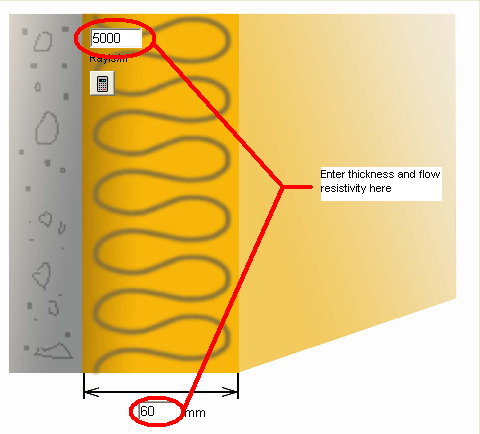
You can enter the thickness of the material and the flow resistivity of the material by clicking in the appropriate box and typing in the desired value.
You can also calculate the flow resitivity based on the material type and density by clicking the calculator button 
Click on the calculate button  and Zorba will calculate the random incidence sound absorption in 1/3 octave bands and display on the graph to the right.
The weighted sound absorption coefficient \alphaW (or for North Americans the NRC) will also be displayed in a box above the graph, with the octave band absorption just to the right of that.
and Zorba will calculate the random incidence sound absorption in 1/3 octave bands and display on the graph to the right.
The weighted sound absorption coefficient \alphaW (or for North Americans the NRC) will also be displayed in a box above the graph, with the octave band absorption just to the right of that.
You can calculate the properties of a system consiting of two different absorptive materials by clicking on the checkbox at the bottom of the screen "Two layers"
Backing & facing#
Click on the boxes along the bottom of the picture to select different buildups for your plain absorber

Absorber types#
Click on the tabs above the main picture and the main picture will display different facings ontop of the absorption blanket. The absorption coefficient prediction is automatically calculated for the particular arrangement of slots shown. The size and spacing of the perforations/slats/slots can be entered into the appropriate box

Results#
The chart on the left hand side will display the calculated performances for your absorber construction. At the top you will see the calculated single number rating and octave band absorption coefficients displayed above the chart. You can change the single number rating between \alphaW and NRC by clicking on the red box.

There are four tabs above the chart which display a range of more detailed results.
